Bounce house
The bounce house is an important part of stream.
In the bounce house you can find:
- various messages
- profile picture orbs
- emotes
- things that go zshoom and pew pew pew
Profile pictures and emotes live in the same space and bounce off of each other, damaging each others in the process. When an orb/emote is hit by another, it shrinks and when small enough it eventually disappears.
Messages
Section titled “Messages”The simplest part of the bounce house is the various messages floating around separately from the orbs. These are user-submitted and appear in the color that you have selected in Twitch chat.
There is a limited number of messages in the bounce house. Messages are put in a queue and each message is guaranteed to be in the bounce house for at least 10 minutes. If new a message is added when the slots are full, it will be added to a queue and oldest message will be removed when their time expires. Otherwise, messages stay indefinitely if the queue is empty.
Commands
Section titled “Commands”| command | cost (gv) | description |
|---|---|---|
!whatever <msg> | 1 | Adds your message to the bounce house. |
Profile pictures
Section titled “Profile pictures”There are always various profile pictures floating around in the bounce house. You too, can join the fun by simply chatting. Each time you chat your profile picture grows in size. The profile picture will then continue to bounce around until it gets too small.
Commands
Section titled “Commands”| command | cost (gv) | description |
|---|---|---|
!vroom | 0 | Gives you more speed. Persists between deaths. |
!gigantify-me | 1 | Drastically grows your orb. |
!vanish | 0 | Remove yourself from the bounce house. |
spin | 0 | Spins your orb around. (can be anywhere in message) |
Emotes
Section titled “Emotes”Emotes can also be found in the bounce house. All emotes sent in chat will be spawned into the bounce house. If an emote already exists, it will simply grow in size.
Colors
Section titled “Colors”Both the border of the orbs and foreground of messages use a unique color that is distinct to you, the user.
Commands
Section titled “Commands”| command | description |
|---|---|
!my-color | Gets your configured color. |
!set-color <#hex6> | Attempts to set your unique user color. |
Colors MUST be unique for each user.
From time to time you can see a ship enter the bounce house. Those are flown by chat and help thin out the chaos in the bounce house.
You too, can control your own ship easily! Follow these easy steps:
- Redeem the Just Zshoom redeem.
- Go to game website and log in using your Twitch account.
- Fly around and shoot as many orbs in the Bounce House as you can.
We support both keyboard and controller input!
Once your time is up, your ship will disappear from the Bounce House, and you’ll see your score for that round in chat. You get an equivalent amount of mega-vip.
How to customize your spaceship

There are seven frames. Each frame is 80 x 45, resulting in a single 560 x 45 spritesheet.
| Frame # | Sprite | Description |
|---|---|---|
| 1 | Ship, idle | |
| 2 | Forward thrusters | |
| 3 | Boost | |
| 4 | Reverse | |
| 5 | Reverse boost | |
| 6 | Turning, counter-clockwise | |
| 7 | Turning, clockwise |
Some frames will be overlaid on top of each other while playing. For example, if the ship is boosting and turning clockwise, frames 1, 3 and 7 are used together.
Pure white pixels will be recolored as the player’s configured color (see !my-color). A customized ship requires at least 1 pure white pixel.
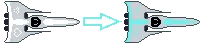
Template (either will do):
The missiles are not customizable.
There is no system in place at this time to upload spritesheet. Discord works in the meantime (see !discord).